End Table Height
Enter the height of your sofa or chair arm to get the end table height range the guides recommend.
Recent
Your last 10 settings, saved only in this browser. Nothing is uploaded.
The End Table Height tool shows the height range that suits an end table placed beside a sofa or chair, based on the height of that piece’s arm. Enter the arm height, measured from the floor to the top of the arm, in inches or centimeters, and the tool calculates a range, a same-height figure and a lower side from your inputs.
The tool runs in your browser. It is free, needs no sign-up, and nothing you type is uploaded. Results are calculated from your numbers and can be compared with typical end table heights of 18–24 in from one named source, which notes that some tables are about 30 in. These are rules of thumb from furniture sites, not a standard, so treat the output as a starting point and compare it with the pieces you are considering.
How to use the End Table Height
- Measure the arm height. Stand a tape measure on the floor next to the sofa or chair and measure up to the top of the arm.
- Type the arm height into the arm height box. You can enter it in inches or centimeters.
- Leave “How far from the arm height” (the tolerance) at its default of 2 in, or change it to a different value in the same unit.
- Read “End table height range”. It shows the arm height minus the tolerance up to the arm height plus the tolerance.
- Read “Same height as the arm”. This is the arm height itself.
- Read “Lower side”. This runs from the arm height minus the tolerance up to the arm height.
- Check the warnings. You will see a warning if the arm height is outside 12–40 in, or if the whole range sits above or below the typical 18–24 in.
- If you see an error, the tolerance is as large as the arm height. Lower the tolerance and check again.
- Compare the table’s depth with the sofa or chair by eye. The tool does not check depth.
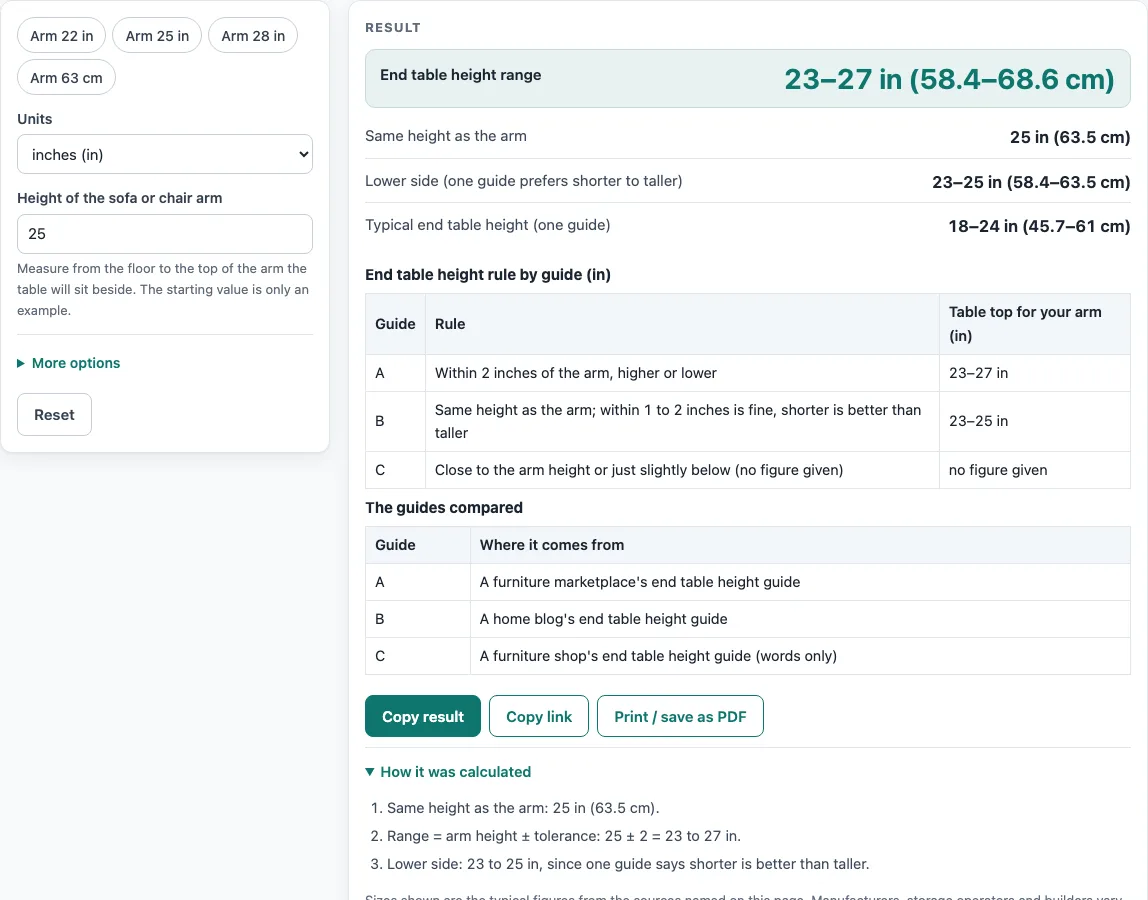
Example: an arm of 25 in with the default tolerance gives a range of 23–27 in (58.4–68.6 cm), a same height of 25 in, and a lower side of 23–25 in.
How tall should an end table be next to a sofa arm?
An end table should sit close to the height of the arm, and the sources differ on how close. The furniture marketplace guide says the top should land within 2 in of the arm height, either higher or lower. The home blog guide says the ideal is the same height as the arm, with 1–2 in of difference being fine, and that a shorter table is better than a taller one.
How does the tool calculate the range?
The tool takes the arm height and subtracts the tolerance to get the lower end of the range, then adds the tolerance to get the upper end. The same-height figure is the arm height unchanged. Using an arm of 28 in and a tolerance of 1 in gives a range of 27–29 in. That result sits above the 18–24 in typical range, so the tool shows a warning. The warning compares your result with that named source; it does not say your table is wrong.
Why does the tool show a lower side?
The two guides point in different directions. One allows the table to be higher or lower than the arm by the full tolerance, while the other prefers a shorter table. To reflect both, the tool shows the full range and a separate lower side line, which covers the part of the range from the arm height minus the tolerance up to the arm height. If you prefer the shorter option, use the lower side figures.
Why does the tolerance matter so much?
The tolerance sets how wide the range is. A larger tolerance gives you more room to choose a table, but it also lets the result move further from the arm. A smaller tolerance narrows the range and produces a tighter target. Because the tolerance defaults to 2 in and can be changed, you can test how much flexibility you want before you choose a table.
Sources (checked 15 October 2026): chairish.com · tidbitsandtwine.com · ashdeco.com
Worked examples
| Input | Result |
|---|---|
| arm 25 in, tolerance 2 in | table 23 to 27 in |
| arm 22 in, tolerance 2 in | table 20 to 24 in |
| arm 28 in, tolerance 1 in | table 27 to 29 in |
| arm 60 cm, tolerance 5 cm | table 21.7 to 25.6 in |
Calculated by the tool above; open it with the same values to see each step.
Frequently asked questions
Does the tool check the depth of the table?
No. The furniture marketplace guide says the table’s depth should not exceed the depth of the chair or sofa, so compare those measurements yourself.
Can I enter the arm height in centimeters?
Yes. Enter the height in inches or centimeters. Results can appear in both units, as the worked example shows the range as 23–27 in (58.4–68.6 cm).
Does the tool work for chair arms as well as sofa arms?
Yes. Enter the height from the floor to the top of the arm of either a sofa or a chair.
What does the warning for an arm outside 12–40 in mean?
The tool flags arm heights below 12 in or above 40 in because they fall outside the range this tool is built to check. Measure again to confirm the number.
What does the 18–24 in warning mean?
It means your whole calculated range sits above or below the typical end table height of 18–24 in given by one named source. It is a comparison, not a verdict, so check the fit against the furniture you are considering.
Is my data sent anywhere?
No. The tool runs in your browser, and nothing you enter is uploaded.
What should I do if I see an error?
The error appears when the tolerance is as large as the arm height. Reduce the tolerance, then read the range again.
Related tools
- Bar Height Table Chart and Size Calculator: use it when you are sizing a table taller than a standard end table.
- Bar Stool Height for Your Counter: use it to match a stool to a counter height.
- Coffee Table Height: use it to check the height of a table placed in front of a sofa.
- Console Table Height: use it when you are choosing a table to stand behind a sofa.
- Counter Height vs Bar Height: use it to understand the difference between two common surface heights.
- Dining Chair Height for Your Table: use it to match chair seats to a dining table.
- Dining Table Size by Number of Seats: use it to plan the size of a dining table for your household.
- Kitchen Island Size Calculator: use it when you are planning an island rather than an end table.