Regular Desk Size
Enter the wall length and floor space you have to see which regular desk sizes fit, with the width and depth range each guide gives.
Recent
Your last 10 settings, saved only in this browser. Nothing is uploaded.
Regular desk size depends on how you use the desk, so this free tool checks which common desk sizes fit the space you enter. Enter your wall length and the floor space from the wall to the next obstacle, and it lists the desks that fit. Everything runs in your browser, nothing is uploaded, and there is no sign-up.
The chart on this page gives typical width and depth (width × depth) for seven uses, from laptop desks to pedestal desks. Each row shows the range across three sources, so you can see where they agree and where they differ. Sizes vary by maker, so treat the results as a starting point and measure your own space first. Results are calculated from your inputs and the typical sizes from the named sources.
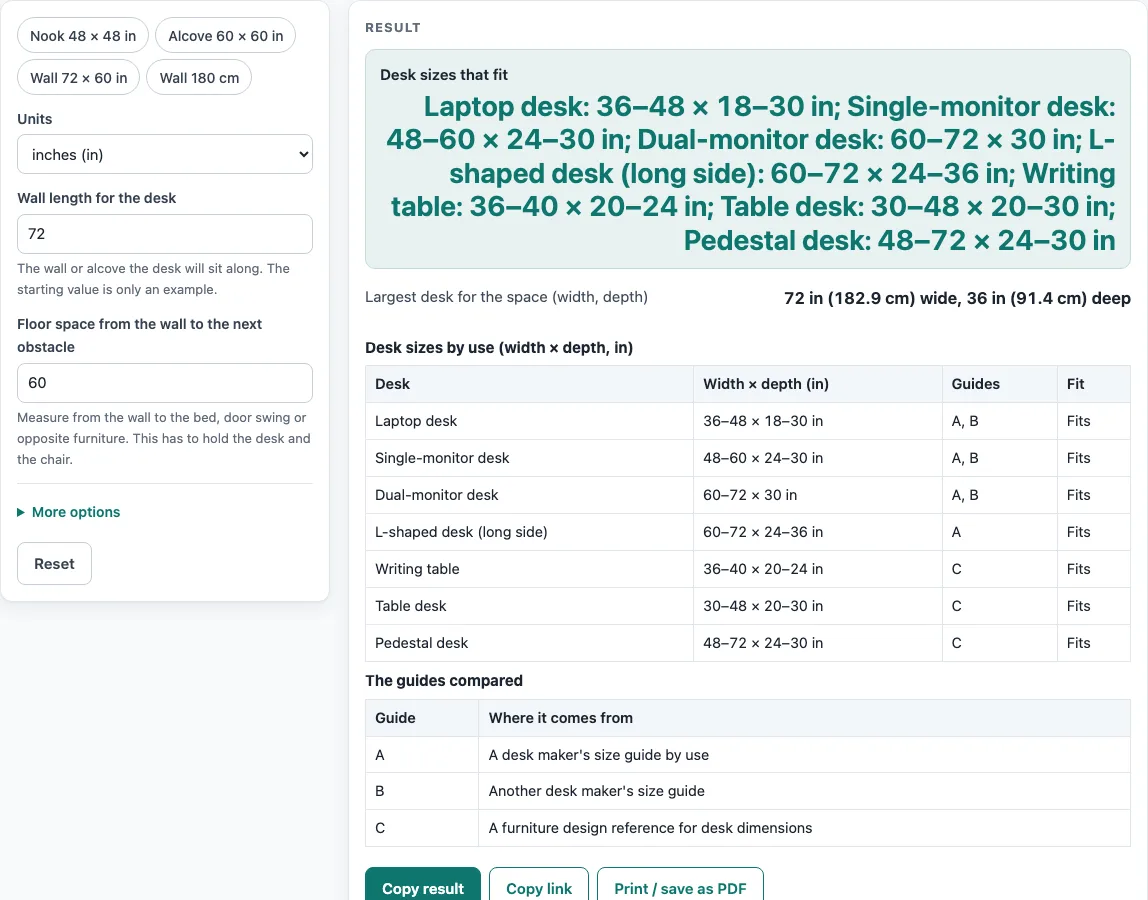
How to use the Regular Desk Size Calculator
- Choose “Units”: inches or centimeters.
- Enter the “Wall length for the desk”, the wall or alcove where the desk will sit. It warns if the value is outside 24 to 240 in.
- Enter the “Floor space from the wall to the next obstacle”, such as a door swing, a bed or other furniture.
- Optional: enter the “Space to keep free along the wall”. This starts at 0.
- Optional: change the “Space behind the chair”. This starts at 24 in, the low end of the 24–36 in range given in guide A.
- Read “Largest desk for the space (width, depth)”. The width equals the wall length minus the space kept free.
- The depth equals the floor space minus the space behind the chair.
- Check “Desk sizes that fit” and “Fit depends on the guide”, and the “Fit” column of the chart, where each desk is marked Fits, Depends on the guide, or Too big.
- Compare the result with the chart.
The tool shows a warning if you enter a wall length outside 24–240 in, if no desk fits, or if the chair space is under 24 in. If the space kept free is as long as the wall, or the chair space is as large as the floor space, the tool shows an error instead of a result.
What is a regular desk size for each use?
A regular desk size depends on what you put on the desk, and the chart lists typical width and depth for each use. The figures below come from three named sources, and the guide that gives each figure is noted where the sources differ.
- Laptop desk: 36–48 × 18–30 in. Guide A gives 36–48 × 18–24 in, and guide B gives 48 × 24–30 in.
- Single-monitor desk: 48–60 × 24–30 in.
- Dual-monitor desk: 60–72 × 30 in.
- L-shaped desk: 60–72 in on the long side × 24–36 in, from guide A.
- Writing table: 36–40 × 20–24 in, from guide C.
- Table desk: 30–48 × 20–30 in, from guide C.
- Pedestal desk: 48–72 × 24–30 in, from guide C.
Guide C is a furniture design reference. Guides A and B are retail and reference pages, not a standard. Drafting desks, which are 36 in deep, and the return lengths of L-shaped desks are not part of the fit check.
How does the tool decide which desks fit?
The tool compares the space you enter with the largest figures each guide gives for each desk. Largest width equals the wall length minus the space you keep free along the wall. Largest depth equals the floor space minus the space behind the chair. Each desk is then marked by how it compares with those limits.
A desk is marked Fits when the largest figures the guides give for it are within both limits. It is marked Depends on the guide when only the smaller figures fit, which means the result changes depending on which guide you follow. It is marked Too big otherwise.
For example, with the default settings of a 72 in wall, 60 in floor space and 24 in chair space, the largest desk is 72 × 36 in, and every desk in the chart fits. With a 48 in wall and 48 in floor space, the largest desk is 48 × 24 in. The writing table fits. The laptop, single-monitor, table and pedestal desks depend on the guide, because their depth goes up to 30 in. The dual-monitor and L-shaped desks are too big.
The guides do not always agree. Laptop desk depth is 18–24 in in guide A and 24–30 in in guide B. Single-monitor width is 48–60 in in guide A and 48 in in guide B. The ranges cover both figures, so the fit status for these desks says Depends on the guide. Sizes also vary by maker, so a desk that fits on paper may still differ in practice.
Sources (checked 15 October 2026): autonomous.ai · versadesk.com · woodbin.com
Worked examples
| Input | Result |
|---|---|
| wall 72 in, floor space 60 in | largest 72 × 36 in; fits: Laptop desk, Single-monitor desk, Dual-monitor desk, L-shaped desk (long side), Writing table, Table desk, Pedestal desk |
| wall 48 in, floor space 48 in | largest 48 × 24 in; fits: Writing table |
| wall 96 in, floor space 66 in | largest 90 × 36 in; fits: Laptop desk, Single-monitor desk, Dual-monitor desk, L-shaped desk (long side), Writing table, Table desk, Pedestal desk |
| wall 150 cm, floor space 150 cm | largest 57.1 × 35.4 in; fits: Laptop desk, Writing table, Table desk |
Calculated by the tool above; open it with the same values to see each step.
Frequently asked questions
Is this regular desk size tool free?
Yes, the tool is free. It runs in your browser, nothing you enter is uploaded, and you do not need to sign up.
Is there one standard size for a desk?
No. Sizes vary by maker, and the guides on this page are retail and reference pages, not a standard. The chart shows typical ranges from three named sources.
Why does my desk say Depends on the guide?
That status appears when only the smaller figures from the guides fit your space. The guides disagree for some desks, so the result changes depending on which figure you use. Measure your space and check the dimensions of the desk you are considering.
What does the warning about wall length mean?
The tool accepts wall lengths from 24 to 240 in. If you enter a value outside that range, it shows a warning. Check the wall length and enter the full length of the wall where the desk will sit.
Why is the chair space set to 24 in?
The default of 24 in is the low end of the 24–36 in range given in guide A. If you enter less than 24 in, the tool shows a warning. You can change the value to match how much room you need behind your chair.
Does the tool check drafting desks or L-shaped return lengths?
No. Drafting desks, which are 36 in deep, and L-shaped return lengths are not part of the fit check. The L-shaped figures shown are for the long side of the desk.
Related tools
- Bar Height Table Chart and Size Calculator: Use it when you are choosing a bar-height table rather than a standard desk.
- Bar Stool Height for Your Counter: Use it to find a stool height that suits your counter.
- Coffee Table Height: Use it when you are planning the height of a coffee table in a living room.
- Console Table Height: Use it when you are choosing a console table for a hallway or behind a sofa.
- Counter Height vs Bar Height: Use it to compare the two heights before you choose a stool or table.
- Dining Chair Height for Your Table: Use it to match a dining chair to the table you already have.
- Dining Table Size by Number of Seats: Use it to estimate a table size for the number of people you seat.
- End Table Height: Use it when you are choosing an end table to sit beside a sofa or chair.