Round Table Sizes, Seats and Room Needed
Enter a round table diameter to see how many people it seats in each guide, the room it needs, the cloth that fits and whether it fits your room.
Recent
Your last 10 settings, saved only in this browser. Nothing is uploaded.
How to use the Round Table Sizes Tool
- Choose your unit under “Units”: inches or centimeters. Type every measurement in that unit.
- Enter the “Table diameter”. The starting value is 60 in. A diameter outside about 24 to 120 in triggers a warning.
- Enter “People to seat (leave empty to skip)”. The starting value is 8. Leave it empty if you only want the table size.
- Set “Clear space around the table”. The starting value is 36 in. A clear space under 36 in triggers a warning.
- Enter “Room length (leave empty to skip)” and “Room width” if you want a fit check. The starting room is empty.
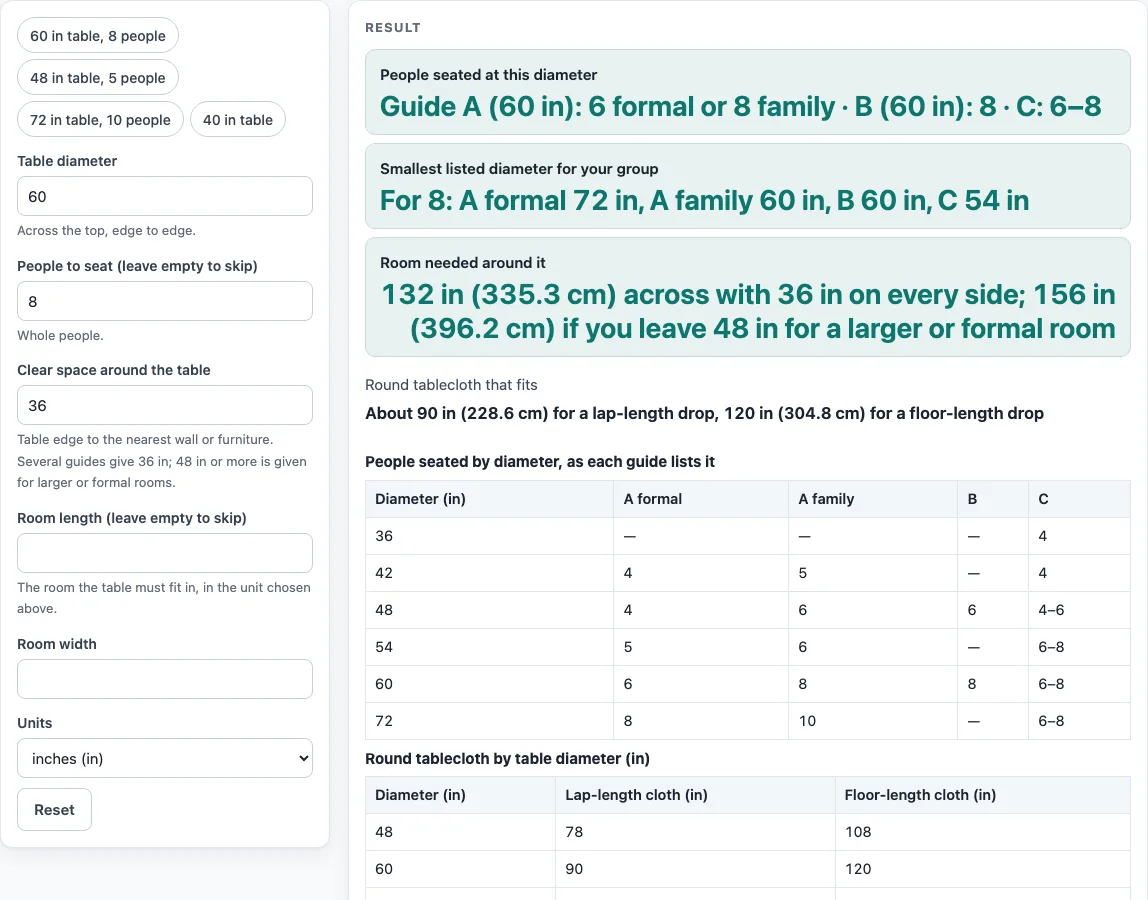
- Read “People seated at this diameter” for the seat count from each guide.
- Read “Smallest listed diameter for your group” to see the smallest listed size that seats your number.
- Read “Room needed around it” and “Round tablecloth that fits”.
- Read “Does it fit your room” to see the result of the fit check.
- Scroll to the tables below the result to compare each guide’s seat counts and tablecloth sizes by diameter.
The four preset buttons fill the fields in one click: “60 in table, 8 people”, “48 in table, 5 people”, “72 in table, 10 people”, and “40 in table”. Use a preset as a starting point, then change the numbers to match your own table or room.
How many people fit around a round table?
The tool reads each guide’s own list at your diameter, or at the next listed size below it. It never averages or interpolates between sizes, so the seat count you see is one the guide actually lists.
The three sources differ. A furniture maker’s dining table guide uses about 30 in per person for formal dining and about 24 in for family dining. It lists 60 in as seating 6 formal or 8 family, and says each 12 in of diameter adds two diners. A restaurant supplier’s folding table guide lists 60 in as 8 seats and notes that the lower numbers seat guests comfortably along the edge. A furniture maker’s table size guide, which agrees with a home-improvement article, gives 6 to 8 seats at 60 in. At 48 in, the three guides give 4 or 6, 6, and 4 to 6.
These counts are typical figures. Chair width and arms change how many people fit, so your own chairs may change the result. The tool states which guide each number comes from.
The “Smallest listed diameter for your group” output finds the smallest listed size that seats your number. For 8 people, the dining guide needs 72 in formal or 60 in family, the restaurant guide needs 60 in, and the size guide needs 54 in. If no listed size seats your group, such as 12 people, the tool says there is no listed size. A diameter below a guide’s smallest listed size is reported as below it.
How much room does a round table need?
The room needed is the diameter plus twice the clear space: room needed = diameter + 2 x clear space. Clear space is the gap from the table edge to the nearest wall or furniture. Several guides give 36 in for this gap. A 60 in table with 36 in on every side needs 132 in (11 ft) across. If you leave 48 in instead, which one source suggests for larger or formal rooms, the figure becomes 156 in.
The fit check compares the short side of the room with the diameter plus clear space on both sides. A 144 x 120 in room just fits a 48 in table with 36 in clear, because that setup needs 120 in and the short side is 120 in. A 168 x 144 in room just fits the 72 in table, which needs 144 in. Type room sizes in the unit you chose under “Units”.
The tablecloth follows a similar formula: cloth size = table diameter + twice the drop. A lap-length drop of about 15 in means a 60 in table takes a 90 in round cloth. A floor-length drop of about 30 in means it takes a 120 in cloth. A 48 in table takes 78 in or 108 in, and a 72 in table takes 102 in or 132 in.
Sources (checked 19 October 2026): Countryside Amish Furniture, dining table seating capacity · GoFoodservice, folding table sizes · Bassett, guide to table sizes
Worked examples
| Input | Result |
|---|---|
| 60 in table, 36 in clear space | room needed 132 in across |
| 48 in table, 36 in clear space | room needed 120 in across |
| 72 in table, 36 in clear space | room needed 144 in across |
| 40 in table, 36 in clear space | room needed 112 in across |
| 60 in table, 36 in clear space | room needed 132 in across |
| 54 in table, 36 in clear space | room needed 126 in across |
Calculated by the tool above; open it with the same values to see each step.
Frequently asked questions
Is the seat count exact?
No. The seat counts are typical figures taken from the named guides. Chair width and arms change how many people fit, so measure your own chairs if the number matters to you.
What should I do if my room fails the fit check?
Try a smaller diameter, and check that the room sizes use the unit you chose under “Units.” Also make sure your clear space is at least 36 in, since smaller values trigger a warning.
Why does the tool say there is no listed size?
None of the three guides lists a table that seats your group. For example, 12 people is more than the largest listed size can seat in any guide, so the tool reports that no listed size works.
Can I use centimeters instead of inches?
Yes. Choose centimeters under “Units” and type all table and room measurements in centimeters. The results appear in the unit you selected.
Does the tool send my measurements anywhere?
No. The tool runs in your browser and does not upload anything you type.
Why do I see a warning or an error?
Warnings appear for a diameter outside about 24 to 120 in or a clear space under 36 in. Errors appear for a zero or non-numeric diameter, or for a number of people that is not a whole number.
Related tools
- Dining Table Size by Number of Seats: Use it when you are sizing a rectangular or other dining table by how many seats you need.
- Folding Table Sizes: Use it when you are choosing folding tables for a event or a shared space.
- Kitchen Island Size: Use it when you are planning the size of an island in a kitchen.
- Rug Size for a Dining Table: Use it when you are choosing a rug to sit under your dining table.
- Tables and Seat Heights: Use it when you want to check table height against seat height.