Standard Desk Height
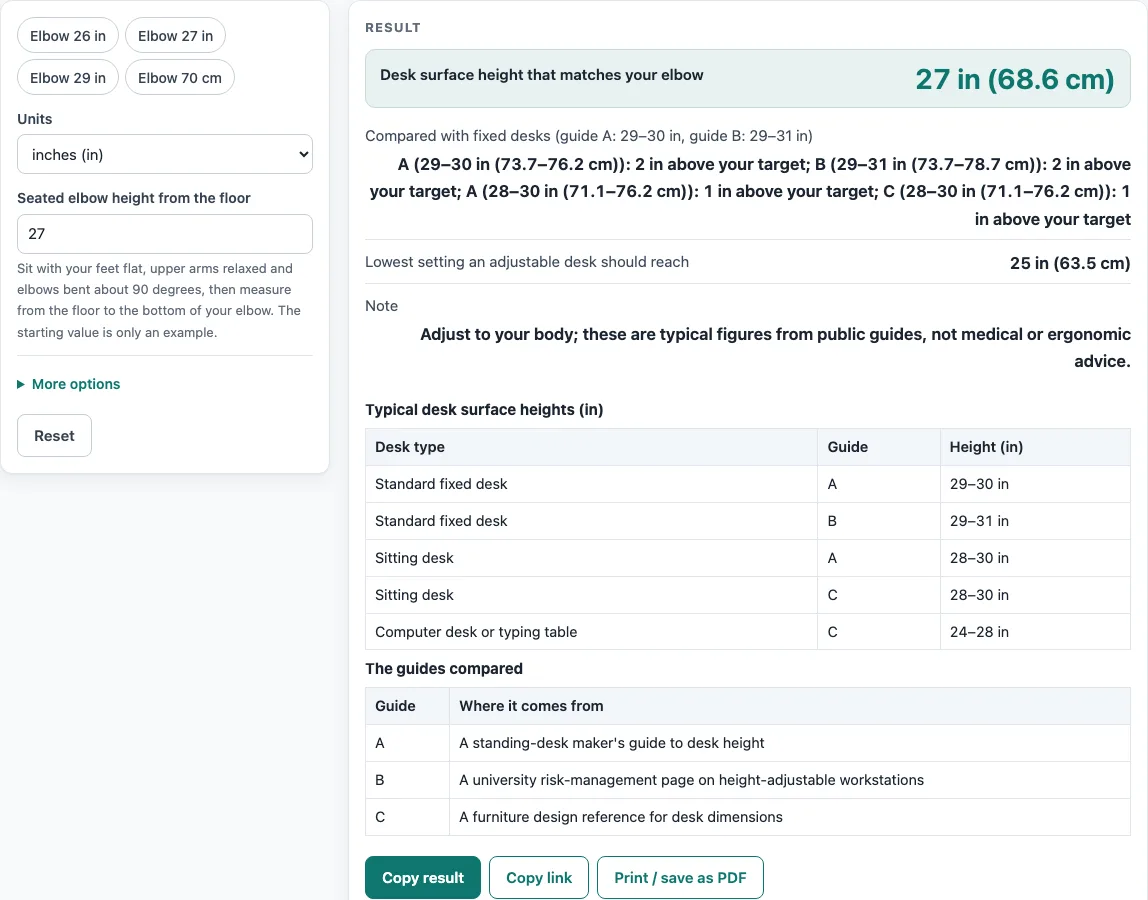
Enter your seated elbow height to get the desk surface height that matches it, and see how it compares with the 28–31 in fixed desks the guides list.
Recent
Your last 10 settings, saved only in this browser. Nothing is uploaded.
How to use the Standard Desk Height Calculator
- Sit in your usual chair with your feet flat on the floor and your elbow bent at about 90 degrees.
- Measure from the floor to the bottom of your bent elbow.
- Choose your unit, in or cm.
- Enter the number in “Seated elbow height from the floor”. The default is 27 in, which is only an example, so replace it with your own measurement.
- Optional: enter the thickness of your keyboard or wrist rest in “Keyboard or wrist rest thickness”. It is 0 by default.
- Read “Desk surface height that matches your elbow”. The result is elbow height minus keyboard thickness.
- Check the comparison. The tool shows how many inches above or below the 29–30 in, 29–31 in and 28–30 in sitting desk ranges your target falls.
- If you use an adjustable desk, note “Lowest setting an adjustable desk should reach”, which is your target minus 2 in.
- If you see a warning, check your numbers. An elbow height outside 18–40 in is flagged as probably a wrong number or unit, and a keyboard thickness as large as the elbow height is an error.
Every result carries the note “Adjust to your body; these are typical figures from public guides, not medical or ergonomic advice.” Conversions use 1 in = 2.54 cm exactly.
What is the standard desk height?
Public sources do not give one number. Fixed desks are listed at 29–30 in by a standing-desk maker (guide A) and at 29–31 in by Colorado State University risk management (guide B). Sitting desks are listed at 28–30 in (guides A and C), and computer desks or typing tables at 24–28 in (guide C). The tool shows each range separately rather than merging them.
Guide B says that fixed workstations at the standard 29–31 in are too high for about 95 % of people. That is a claim from that source, not a finding made here. It is one reason a personal number can differ from a typical figure.
How is desk height worked out from elbow height?
The tool uses one rule: desk surface height equals seated elbow height minus keyboard or wrist-rest thickness. Guide A says the correct desk height is your seated elbow height, so the keyboard thickness is the only adjustment the tool makes. Guide B adds that the work surface should let the elbows hang by the torso at about 90 to 110 degrees.
No public source gives a formula from body height to seated desk height, so the tool does not ask for your height. The 27 in starting value is only an example.
A range that sits above your target means that desk would hold your work surface higher than your elbows suggest. Worked example 1: an elbow height of 27 in with no keyboard gives 27 in (68.6 cm). The 29–30 in and 29–31 in desks sit 2 in above that target, and the 28–30 in desks sit 1 in above it.
Worked example 2: an elbow height of 30 in with a 1 in keyboard gives 29 in, which falls inside both the 29–30 in and 29–31 in ranges.
The lowest setting for an adjustable desk is your target minus 2 in. Guide A says it should be at least 2 in below sitting elbow height.
Sources (checked 15 October 2026): autonomous.ai · rmi.colostate.edu · woodbin.com
Worked examples
| Input | Result |
|---|---|
| elbow 27 in, keyboard 0 in | surface 27 in (68.6 cm) |
| elbow 29.5 in, keyboard 0 in | surface 29.5 in (74.9 cm) |
| elbow 30 in, keyboard 1 in | surface 29 in (73.7 cm) |
| elbow 70 cm, keyboard 2 cm | surface 26.8 in (68 cm) |
Calculated by the tool above; open it with the same values to see each step.
Frequently asked questions
Is 30 inches the standard desk height?
Not as a single rule. Guide A lists fixed desks at 29–30 in, guide B lists 29–31 in, and sitting desks at 28–30 in appear in guides A and C. Your own elbow height gives a more specific target.
Why does the tool not ask for my body height?
No public source gives a formula from body height to seated desk height. The tool therefore uses your seated elbow height, which you measure directly.
What keyboard thickness should I enter?
The keyboard thickness field is optional and starts at 0. Guide A advises subtracting 0.5 to 1 in for a thick mechanical keyboard or wrist rest, so enter a value in that range if your keyboard or rest is thick.
What does it mean when my target is above or below a range?
The tool states how many inches above or below each range your target falls. A desk range above your target sits higher than your elbow height suggests, and a range below it sits lower.
Can I use centimeters instead of inches?
Yes. Choose cm as the unit before you enter your elbow height. Conversions use 1 in = 2.54 cm exactly.
Does my chair seat height need to match?
The tool does not give a chair seat height pairing, because no source with a numeric pairing was found. Your seated elbow height is measured with your feet flat, so use the chair you normally sit in.
Related tools
- Bar Height Table Chart and Size Calculator: use it when you are choosing a tall table and want typical bar heights.
- Bar Stool Height for Your Counter: use it when you need a stool height that matches a counter.
- Coffee Table Height: use it when you are sizing a table for a sofa or seating area.
- Console Table Height: use it when you are choosing a narrow table for a hallway or behind a sofa.
- Counter Height vs Bar Height: use it when you are deciding between a counter and a bar height for a space.
- Dining Chair Height for Your Table: use it when you are matching chairs to a dining table.
- Dining Table Size by Number of Seats: use it when you are choosing a table size for a set number of people.
- End Table Height: use it when you are sizing a table to sit beside a sofa or chair.