Standing Desk Height
Enter your height (with shoes) or your standing elbow height to get a standing desk surface height, plus the change from your seated setting.
Recent
Your last 10 settings, saved only in this browser. Nothing is uploaded.
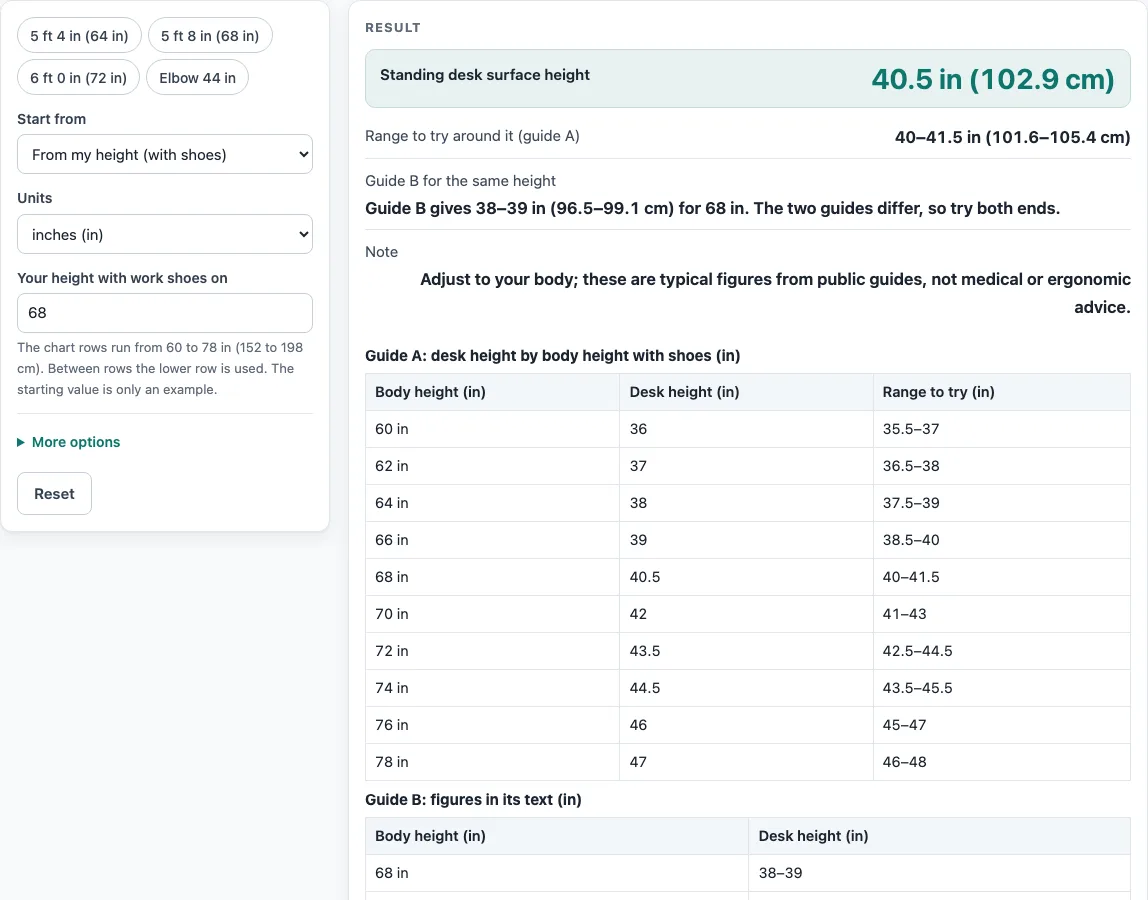
How to use the standing desk height tool
- Under “Units”, choose inches (in) or centimeters (cm) for the measurements you enter.
- Under “Start from”, choose “From my height (with shoes)” or “From my standing elbow height”. For the elbow option, measure from the floor to the bottom of your elbow with your elbows bent about 90 degrees.
- Enter the measurement you chose. Both guides say shoes matter, so measure in the shoes you usually work in.
- Optional: enter the “Keyboard or wrist rest thickness”. It starts at 0. Guide A advises 0.5–1 in for a thick mechanical keyboard.
- Optional: enter the “Seated desk height (optional)”, which is your seated elbow height. The tool then shows the “Seated desk setting” (that height minus the keyboard thickness) and the “Change between sitting and standing”.
- Read “Standing desk surface height”, with a cm figure in brackets, and “Range to try around it (guide A)”.
- Compare the guides. For the 68 in and 72 in rows, “Guide B for the same height” appears next to guide A. The two are never averaged.
- Check any warnings. Heights under 60 in have no chart row, and heights above 78 in use the last row. A result above 49 in, or a seated setting below 22 in, also triggers a warning, as does a height outside 48-90 in or an elbow height outside 30-60 in.
Every result carries this note: “Adjust to your body; these are typical figures from public guides, not medical or ergonomic advice.”
How is standing desk height calculated?
From your height, the tool reads the chart from guide A, a standing-desk maker, and uses the row for your height. From your standing elbow height, the desk surface equals that elbow height minus your keyboard thickness.
The height route uses rows from 60 in to 78 in, in steps of 2 in. Each row gives a desk height, such as 40.5 in for 68 in and 42 in for 70 in. Each row also has a range to test, about 1 in either side. When your height falls between two rows, the tool uses the lower row, because guide A says to start at the lower number. A height of 69 in, for example, uses the 68 in row. Heights under 60 in have no row, and heights above 78 in use the last row, with a warning in both cases.
Worked example: 178 cm equals 70.08 in. That falls on the 70 in row, which gives 42 in (106.7 cm).
The elbow route is simpler. If your standing elbow height is 44 in and your keyboard is 1 in thick, the desk surface is 43 in. With the keyboard thickness left at its default of 0, the desk surface equals your elbow height. Guide C, from Colorado State University, describes the target as elbows hanging by the torso at about 90–110 degrees, sitting or standing. Measuring with your elbows bent about 90 degrees falls inside that range, so it gives you a starting figure.
Why do standing desk height sources give different numbers?
Each maker publishes its own figures, so the page shows them side by side rather than averaging them. Guide A and guide B do not match. For 5 ft 8 in, guide A gives 40.5 in with a test range of 40–41.5 in, while guide B gives 38–39 in. For 6 ft 0 in, guide A gives 43.5 in (42.5–44.5 in), and guide B gives 40–44 in. For 6 ft 8 in, guide B gives about 42–43 in.
Shoes add another difference. Guide A adds heel height to your standing height, and guide B says 2 in heels mean a desk 2 in higher.
Limits also vary. Guide D, a desk maker, says most height-adjustable desks go from about 22–23 in up to about 46–49 in. That is why the page warns when a result is above 49 in or a seated setting is below 22 in. Use the range to test, and choose the height that feels right for your body.
Sources (checked 15 October 2026): autonomous.ai · flexispot.com · rmi.colostate.edu · versadesk.com
Worked examples
| Input | Result |
|---|---|
| height 68 in | standing desk 40.5 in (102.9 cm) |
| height 72 in | standing desk 43.5 in (110.5 cm) |
| standing elbow 44 in | standing desk 43 in (109.2 cm) |
| height 178 cm | standing desk 42 in (106.7 cm) |
Calculated by the tool above; open it with the same values to see each step.
Frequently asked questions
What standing desk height should a 5 ft 8 in person use?
Guide A gives 40.5 in with a range of 40–41.5 in, and guide B gives 38–39 in. The page shows both, so test the desk across the range and choose what suits your setup.
Why does the tool use the lower chart row?
Guide A says to start at the lower number, so between two rows the tool uses the lower one. A height of 69 in, for example, uses the 68 in row and gives 40.5 in.
Do my shoes change the result?
Both guides say shoes matter. Guide A adds heel height to your standing height, and guide B says 2 in heels mean a desk 2 in higher. Measure in the shoes you usually work in.
Can I enter my height in cm?
Yes. Choose “cm” as your unit. For example, 178 cm equals 70.08 in, which uses the 70 in row and gives 42 in (106.7 cm).
What happens if I am under 60 in or over 78 in?
Under 60 in, the chart has no row, so the tool shows a warning. Above 78 in, it uses the last row, 47 in, and also shows a warning. Check the desk carefully before you settle on a height.
What is the seated setting?
If you enter a seated desk height, which is your seated elbow height, the tool shows the seated setting and the change in in between sitting and standing. A seated setting below 22 in triggers a warning.
Is this result medical or ergonomic advice?
No. Every result carries the note “Adjust to your body; these are typical figures from public guides, not medical or ergonomic advice.” Use the figure as a starting point.
Related tools
- Bar Height Table Chart and Size Calculator: use it when you are choosing a table or bar surface and want its height in one place.
- Counter Height vs Bar Height: use it to compare the two surface heights side by side before you choose.
- Dining Chair Height for Your Table: use it to match a chair to a table you already own.
- Console Table Height: use it to check the height of a console table you plan to place against a wall.
- Coffee Table Height: use it when you need a low surface for a sofa or chair.