TV Stand Size Calculator
Enter your TV screen size to get its real width and height, how wide the stand should be, and the viewing distance.
Recent
Your last 10 settings, saved only in this browser. Nothing is uploaded.
How to use the TV stand size calculator
- Enter the diagonal of the TV screen in the “diagonal” box. You can use inches or centimeters. Values from 10 to 120 in work. Anything outside that range shows a warning.
- Choose a stand width rule. Rule 1 comes from two guides and adds 4 to 6 in to the TV width. Rule 2 comes from one guide and adds 2 to 6 in. Pick the one you want to follow.
- Optional: type the TV width from the spec sheet into the “TV width” box. The stand rule then uses that number instead of the formula. The width must be smaller than the diagonal, or the tool shows an error. If it does not match a 16:9 screen of that diagonal, you will see a warning.
- Optional: enter your seated eye height in the “seated eye height” box to get a stand height.
- Read the results: TV width, TV height, minimum stand width, viewing distance and, if you entered eye height, stand height.
- If you see an error, check the box it names. Errors appear for blank, non-numeric, zero or negative diagonals, and for a typed width that is not smaller than the diagonal.
- Check the warning about eye height. It appears when the eye height is too low for the TV.
The page also has a chart for 32, 43, 50, 55, 65, 75 and 85 in TVs. It lists the computed width and height, the stand width for your chosen rule, and the stand width range from one furniture guide.
How is TV width worked out from the diagonal?
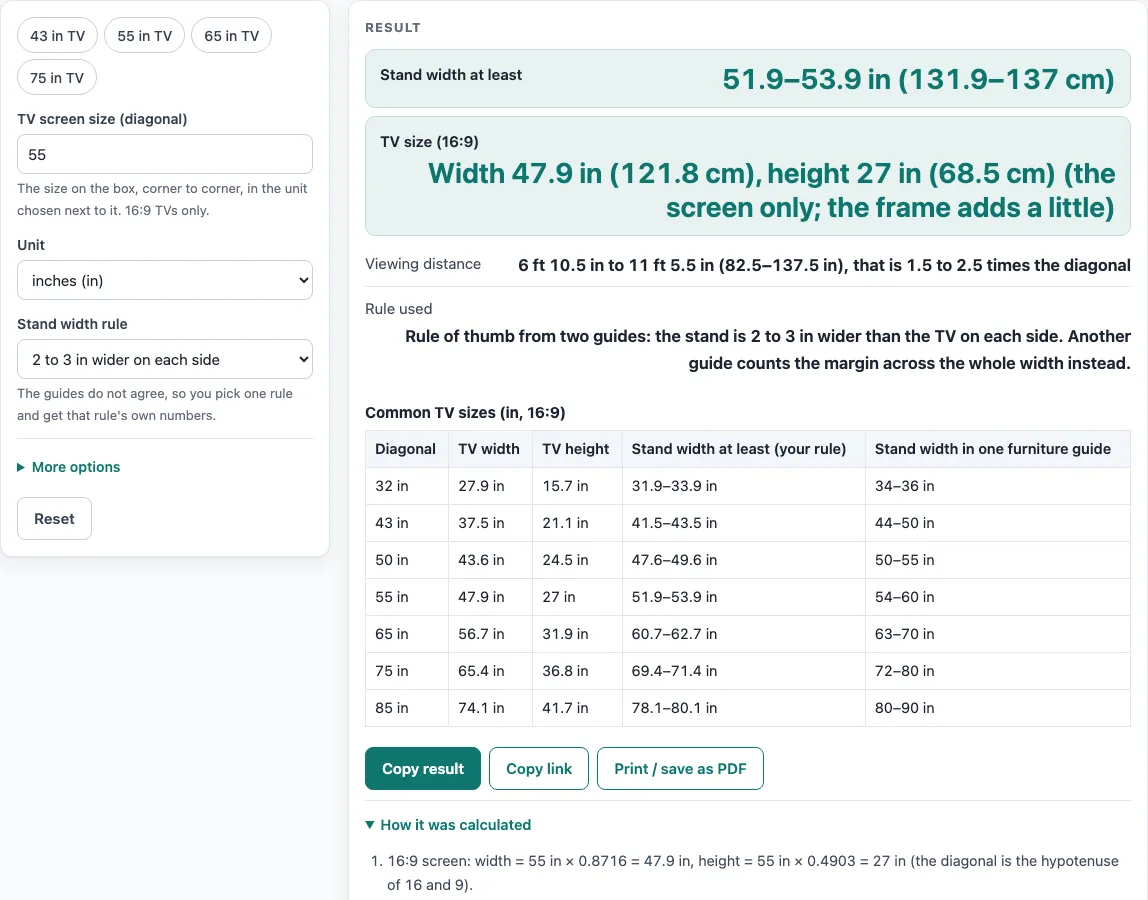
The tool treats the screen as a 16:9 rectangle and uses Pythagoras to split the diagonal into width and height. Width equals diagonal x 16/sqrt(337), which is 0.8716 x diagonal, and height equals diagonal x 9/sqrt(337), which is 0.4903 x diagonal. For a 55 in TV, that gives 47.9 in (121.8 cm) wide and 27 in (68.5 cm) tall. The diagonal measures only the screen, so the frame adds a little extra width and height. Real sets also differ slightly from the formula: a 65 in TV gives 56.7 in here, while one maker lists 57 to 58 in.
How much wider than the TV should a stand be?
The answer depends on the rule you choose, because the guides count the margin differently. Rule 1 adds 2 to 3 in on each side, so the stand width is TV width plus 4 to 6 in. Rule 2 adds at least 2 to 6 in in total, so the stand width is TV width plus 2 to 6 in. For a 55 in TV, rule 1 gives 51.9 to 53.9 in (131.9 to 137 cm). The same guide’s own table lists 54 to 60 in for a 55 in TV, which is wider than its 2 to 6 in rule gives (49.9 to 53.9 in). That table is shown as its own column and is not merged with the calculated numbers.
How far should you sit from the TV?
Two guides suggest a viewing distance of 1.5 to 2.5 times the diagonal. For a 55 in TV, that is 82.5 to 137.5 in, or 6 ft 10.5 in to 11 ft 5.5 in. Another guide says about double the diagonal, which is 110 in (9 ft 2 in) for a 55 in TV. These are rules of thumb, not fixed limits, and the tool does not use resolution-based distances.
How tall should a TV stand be?
Stand height is optional. One guide sets it at seated eye height minus half the TV height, within an inch or two. For a 75 in TV with a 42 in seated eye height, the result is 23.6 in. Another guide says the top of a stand is typically 20 to 30 in from the floor. If the eye height you enter is too low for the TV, the tool shows a warning.
Sources (checked 15 October 2026): livingspaces.com · plankandbeam.com · fitueyes.com · castlery.com
Worked examples
| Input | Result |
|---|---|
| 55 in TV, 2 to 3 in wider on each side | TV width 47.9 in (121.8 cm); stand at least 51.9–53.9 in (131.9–137 cm) |
| 65 in TV, 2 to 6 in wider in total | TV width 56.7 in (143.9 cm); stand at least 58.7–62.7 in (149–159.1 cm) |
| 75 in TV, 2 to 3 in wider on each side | TV width 65.4 in (166 cm); stand at least 69.4–71.4 in (176.2–181.3 cm) |
| 140 cm TV, 2 to 3 in wider on each side | TV width 48 in (122 cm); stand at least 52–54 in (132.2–137.3 cm) |
| 65 in TV, 2 to 3 in wider on each side | TV width 57.2 in (145.3 cm); stand at least 61.2–63.2 in (155.4–160.5 cm) |
Calculated by the tool above; open it with the same values to see each step.
Frequently asked questions
Does the stand have to be exactly as wide as the TV?
No. The result is a minimum stand width based on the rule you chose, so a stand that is wider than that minimum is still within the range. Compare your choice with the chart on the page.
Why does my TV measure a little different from the result?
The result comes from the diagonal and a 16:9 shape, and real sets vary slightly by maker. Type the width from your spec sheet to use that number for the stand rule.
Does this tool work for TVs that are not 16:9?
No. The tool is for 16:9 TVs only. If a typed width does not match a 16:9 screen, the tool shows a warning.
Can I use a floor stand that attaches through the TV’s mounting holes?
This tool does not cover those stands. Some floor stands that attach through the mounting holes can be narrower than the TV, so the rules here do not apply to them.
Is the viewing distance a rule I must follow?
No. It is a rule of thumb. Two guides say 1.5 to 2.5 times the diagonal, and another says about double the diagonal, so choose the range that suits your room.
Does the calculator send my numbers anywhere?
No. The tool runs in your browser, nothing you type is uploaded, you do not need to sign up, and it is free to use.
Related tools
- Bathroom Mirror Size for Your Vanity: use it to size a mirror to sit above a vanity.
- Picture Hanging Height Calculator: use it to find the height for hanging a picture on a wall.
- Standard Sofa Dimensions: use it to compare sofa sizes when planning a living room layout.
- Wall Art Size Guide: use it to choose the size of wall art for a space.