Wall Art Size Guide
Enter the width of the furniture below and how many frames you want to get the art width, the size of each frame and where the bottom edge goes.
Recent
Your last 10 settings, saved only in this browser. Nothing is uploaded.
How to use the Wall Art Size Guide
- Choose your “Unit”, in or cm, and enter the “Width of the furniture below” (the sofa, console, bed or other piece below the art). Blank, non-numeric, zero or negative widths produce an error. Furniture outside 12 to 240 in gives a warning.
- Enter the “Number of frames”. This must be a whole number of 1 or more. Above 20 frames gives a warning.
- Pick a “Width rule”: two-thirds to three-quarters, two-thirds, or three-quarters. The first option gives you a range.
- If you are hanging more than one frame, set the “Space between frames”. The default is 2 in. A value that leaves no width for the frames gives an error.
- Enter the “Height of the furniture top”. The default is 36 in.
- Enter the “Gap from furniture to the art”. The default is 8 in. A gap above 12 in gives a warning.
- Read the results: “Art width (whole grouping)”, “Width of each frame” when you use several, and “Bottom edge of the art from the floor”. “Gap above the furniture, by guide” and “Space between frames, by guide” list the guides’ figures.
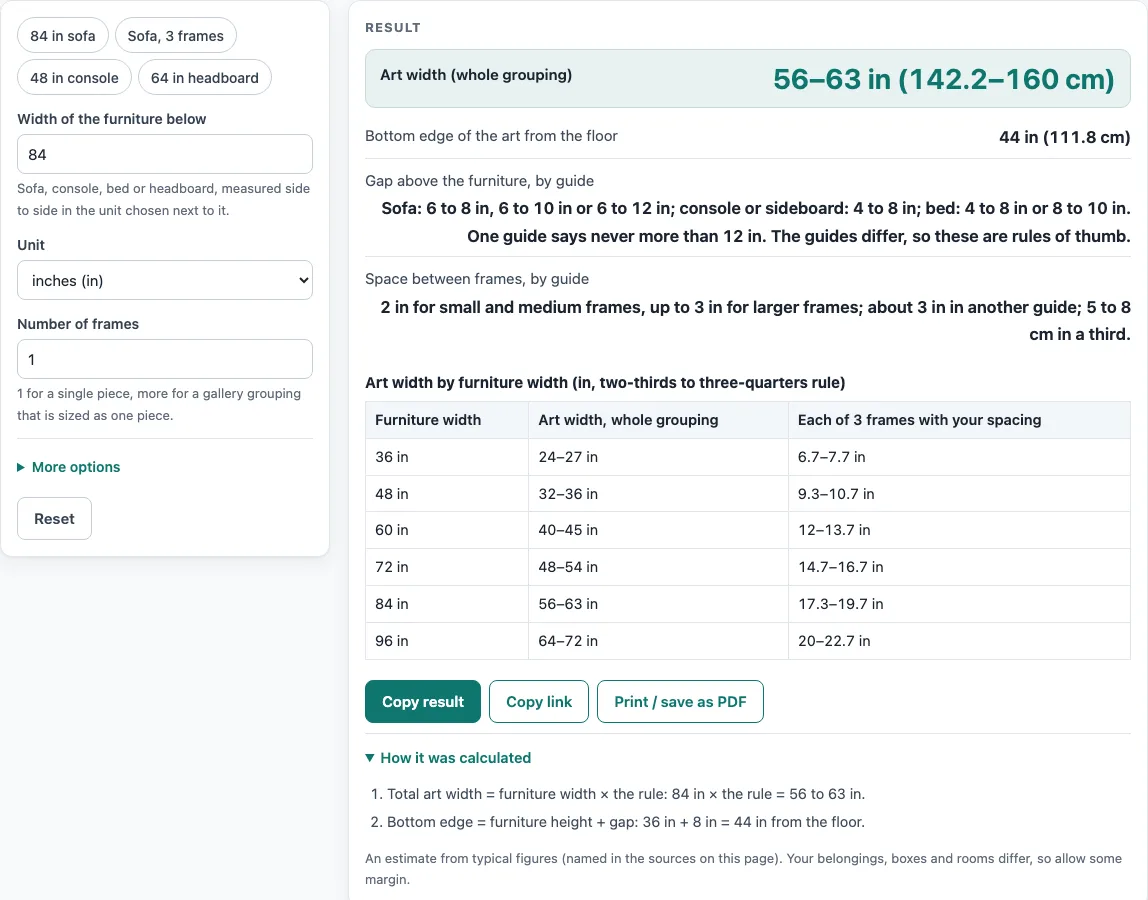
For a worked example, enter an 84 in sofa with 1 frame. The art width is 56 to 63 in, and with the default values the bottom edge sits 44 in (111.8 cm) from the floor.
The page also includes a chart of furniture widths from 36 to 96 in, showing the art width and each frame width at your spacing.
How wide should wall art be above a sofa?
Wall art above a sofa is usually sized at two-thirds to three-quarters of the sofa width. This is a rule of thumb, not a fixed measurement. For an 84 in sofa, the tool gives 56 to 63 in (142.2 to 160 cm).
How is the width of a frame grouping worked out?
With several frames, the tool treats the whole group as one piece sized by the same rule. Each frame width is calculated as (total width minus gap times (frames minus 1)) divided by the number of frames. For example, three frames 3 in apart on an 84 in sofa give a grouping of 56 to 63 in and each frame of 16.7 to 19 in.
How much space should go between frames?
The tool uses the value you set, with a default of 2 in. Sources differ here. One guide suggests 2 in for small and medium frames and up to 3 in for larger ones, another suggests about 3 in, and a poster shop suggests 5 to 8 cm. Choose the spacing that suits your frames and enter it yourself.
How far above furniture should the art hang?
The gap from the top of the furniture to the bottom of the art depends on the furniture. Guides give 6 to 8 in above a sofa (two guides), 6 to 10 in (one guide) and 6 to 12 in (an art advisor). Above a console or sideboard they give 4 to 8 in, and above a bed 4 to 8 in or 8 to 10 in, so the figures differ by guide. One guide says the gap should never be more than 12 in. The bottom edge from the floor is the furniture height plus this gap, which is 36 + 8 = 44 in (111.8 cm) with the default values.
When should I adjust the ratio?
The ratios are rules of thumb. One guide says a deep sectional may take larger art and a narrow console lighter art. Use the result as a starting point, then compare it with the wall and the furniture you actually have.
Sources (checked 15 October 2026): mixtiles.com · austingallery.org · passion4art.com · livingetc.com · web.minted.com · edwardmartin.com
Worked examples
| Input | Result |
|---|---|
| 84 in furniture, 1 frame(s) | art width 56–63 in (142.2–160 cm) |
| 84 in furniture, 3 frame(s) | art width 56–63 in (142.2–160 cm) |
| 60 in furniture, 1 frame(s) | art width 40 in (101.6 cm) |
| 213 cm furniture, 1 frame(s) | art width 55.9–62.9 in (142–159.8 cm) |
Calculated by the tool above; open it with the same values to see each step.
Frequently asked questions
What is the wall art size guide for?
It gives a starting art width and bottom edge height for art above a sofa, console, bed or other furniture. It also sizes a group of frames as one piece.
Are the results a required size?
No. The results are calculated from your inputs and from typical sizes in named sources. Sizes vary by maker and by room, so treat them as a guide.
Why does the tool show a range for art width?
The default width rule is two-thirds to three-quarters of the furniture width, so the tool shows the smallest and largest result. Choose “two-thirds” or “three-quarters” to narrow it to one end.
Can I use centimetres instead of inches?
Yes. Choose cm for the furniture width, and the results are shown with cm conversions, such as 111.8 cm for the 44 in bottom edge.
What if the furniture is a sectional or a narrow console?
Use your own judgement. One guide says a deep sectional may take larger art and a narrow console lighter art, so the rule of thumb may need adjusting.
What happens if I leave a field blank?
The tool shows an error instead of a result. Blank, non-numeric, zero or negative widths, negative spacing or gaps, and frame counts that are not whole numbers of 1 or more all produce errors.
Related tools
- Bathroom Mirror Size for Your Vanity: use this when you are choosing a mirror to hang above a bathroom vanity.
- Picture Hanging Height Calculator: use this when you need to work out where to place a single picture on the wall.
- Standard Sofa Dimensions: use this when you need sofa sizes to enter as the furniture width.
- TV Stand Size Calculator: use this when you are sizing the stand or unit a television sits on.